# Magento2 定制支付流程
**URL:** https://forum.magentochina.org/t/magento2-%E5%AE%9A%E5%88%B6%E6%94%AF%E4%BB%98%E6%B5%81%E7%A8%8B/798
**Category:** Magento 2.X
**Tags:** 开发, magento2, 教程
**Created:** [2020 年8 月 15 日 12:55 UTC](https://forum.magentochina.org/t/magento2-%E5%AE%9A%E5%88%B6%E6%94%AF%E4%BB%98%E6%B5%81%E7%A8%8B/798 "2020-08-15T12:55:40Z")
**Posts on this page:** 1
**Showing post:** 1
### 作者:  [@Vicky](https://forum.magentochina.org/u/Vicky)
#### 发布日期: [2020 年8 月 15 日 12:55 UTC](https://forum.magentochina.org/t/magento2-%E5%AE%9A%E5%88%B6%E6%94%AF%E4%BB%98%E6%B5%81%E7%A8%8B/798/1 "2020-08-15T12:55:40Z")
定制下单步骤就意味着移除、禁用或者添加组件。
### 本文主要内容
- 第一步:理解来自 Devdocs 文档的例子
- 第二步:添加新的订阅组件
### 第一步:理解来自 Devdocs 文档的例子
Devdocs 给了一个 Magento Shipping 的例子,是一个关于规则组件,这是把组件添加到布局的代码:
```auto
-
- Magento_Shipping/js/view/checkout/shipping/shipping-policy
```
如你所见,组件就是一个 Javascript 文件。打开 vendor/magento/module-shipping/view/frontend/web/js/view/checkout/shipping/shipping-policy.js
```auto
/**
* Copyright © 2013-2017 Magento, Inc. All rights reserved.
* See COPYING.txt for license details.
*/
define([
'uiComponent',
'Magento_Shipping/js/model/config'
], function (Component, config) {
'use strict';
return Component.extend({
defaults: {
template: 'Magento_Shipping/checkout/shipping/shipping-policy'
},
config: config()
});
});
```
没什么信息,就是定义了组件的模板是 vendor/magento/module-shipping/view/frontend/web/template/checkout/shipping/shipping-policy.html 。由此可推断,一个组件包括一个 js 文件和一个 html 模板文件。
### 第二步:添加要给新的订阅注册组件
#### 1. 新建一个 js 文件
在 Mageplaza/HelloWorld/view/frontend/web/js/view 目录下创建 newsletter.js 文件,代码如下:
```auto
define(
[
'ko',
'uiComponent'
],
function (ko, Component) {
"use strict";
return Component.extend({
defaults: {
template: 'Mageplaza_HelloWorld/newsletter'
},
isRegisterNewsletter: true
});
}
);
```
#### 2. 创建模板 html 文件
在 Mageplaza/HelloWorld/view/frontend/web/template 目录下创建 newsletter.html 文件,代码如下:
```auto
```
#### 3. 把我们的组件添加到下单页面的布局中
把以下代码添加到 Mageplaza/HelloWorld/view/frontend/layout/checkout\_index\_index.xml ,我们的组件在 shippingMethod 表单之前。
```auto
-
-
-
-
-
-
-
-
-
-
-
-
- Mageplaza_HelloWorld/js/view/newsletter
```
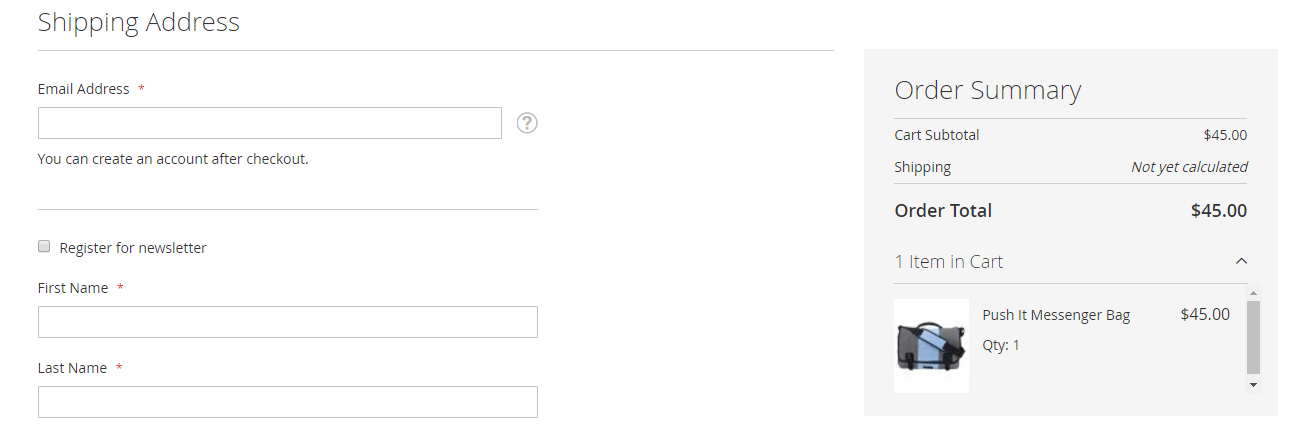
清除缓存刷新浏览器,结果如下:
#### 4. 禁用订阅注册组件
以下代码是禁用组件的:
```auto
-
- true
```
完整代码如下:
```auto
-
- Mageplaza_HelloWorld/js/view/newsletter
-
- true
```
#### 5. 移除组件
为了移除一个组件,需要为 \Magento\Checkout\Block\Checkout\LayoutProcessor::process 这个方法创建一个插件。Devdocs 建议执行 around 方法,代码如下:
```auto
public function aroundProcess($subject, $proceed, $jsLayout)
{
unset($jsLayout['components']['checkout']['children']['steps']['children']['shipping-step']['children']['shippingAddress']['children']['before-form']['children']['newsletter']);
$returnValue = $proceed($jsLayout);
return $returnValue;
}
```
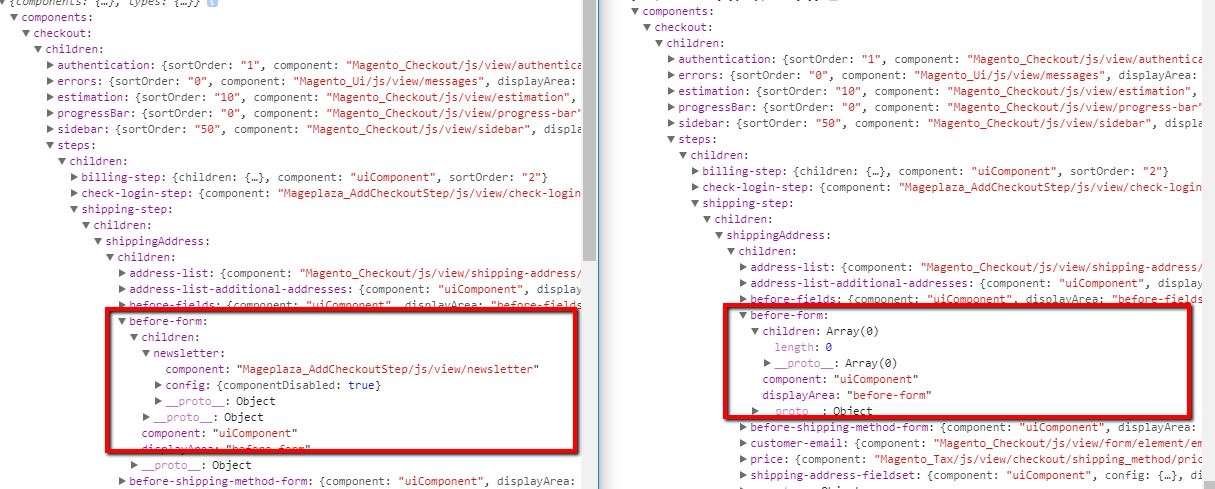
以下是时间运行时禁用和移除组件的区别:
## 本教程翻译自Mageplaza模块开发系列,其他内容请点击下面链接:
> [@Magento2模块开发中文教程索引](https://forum.magentochina.org/t/magento2%E6%A8%A1%E5%9D%97%E5%BC%80%E5%8F%91%E4%B8%AD%E6%96%87%E6%95%99%E7%A8%8B%E7%B4%A2%E5%BC%95/36):
>
> 本文翻译自mageplaza的Magento2模块开发教程,而且正在翻译中. 翻译也是非常好的学习方式,希望下列表中还有我们没有翻译,而你又想分享的内容,请发表文章之后,在下面附上地址。 如果觉得本站翻译得内容对您有帮助,又没有时间帮助翻译回馈社区.请打赏我们,您的支持是我们的动力: 转载说明:非常欢迎转载,但是必须保证文章的完整性并附上原文地址和翻译原文的地址,保证阅读者不会产生歧义. 目录索引: 索 引 中 文 原 文 1 [Magento2如何创建模块](https://forum.magentochina.org/t/Magento-2%E5%A6%82%E4%BD%95%E5%88%9B%E5%BB%BA%E6%A8%A1%E5%9D%97%E6%95%99%E7%A8%8B/38)[How to Create Module in Magento 2](https://www.mageplaza.com/kb/how-create-hello-world-module-magento-2.html) 2 [控制器详解](https://forum.magentochina.org/t/Magento-2%E6%8E%A7%E5%88%B6%E5%99%A8%E8%AF%A6%E8%A7%A3%E6%95%99%E7%A8%8B/39)[Create Controllers](https://www.mageplaza.com/magento-2-module-development/how-to-create-controllers-magento-2.html) 3 [CRUD 模型](https://forum.magentochina.org/t/Magento2-CRUD%E6%A8%A1%E5%9E%8B%E8%B5%84%E6%BA%90%E9%9B%86%E5%90%88%E5%B7%A5%E5%8E%82%E5%AF%B9%E8%B1%A1%E8%AF%A6%E8%A7%A3%E6%95%99%E7%A8%8B/43)[CRUD Models](https://www.mageplaza.com/magento-2-module-development/how-to-create-crud-model-magento-2.html) 4 [视图层:块,布局和模板](https://forum.magentochina.org/t/%E8%A7%86%E5%9B%BE%E5%B1%82%E5%9D%97%E5%B8%83%E5%B1%80%E5%92%8C%E6%A8%A1%E6%9D%BF%E6%A8%A1%E6%9D%BF%E6%95%99%E7%A8%8B/50/1)[View: Block, Layouts and templates](https://www.mageplaza.com/magento-2-module-development/view-block-layout-template-magento-2.html) 5 [配置system.xml](https://forum.magentochina.org/t/%E5%A6%82%E4%BD%95%E5%88%9B%E5%BB%BA%E7%B3%BB%E7%BB%9F%E9%85%8D%E7%BD%AE%E6%96%87%E4%BB%B6systemxml/55)[Configuration - System.xm…](https://www.mageplaza.com/magento-2-module-development/create-system-xml-configuration-magento-2.html)
---
_[View the full topic](https://forum.magentochina.org/t/magento2-%E5%AE%9A%E5%88%B6%E6%94%AF%E4%BB%98%E6%B5%81%E7%A8%8B/798)._